Marvel casino registration: create and set up an account
Published:
The Marvel casino registration form is designed around a few core choices: email, password, account currency and whether to receive promotional messages. The welcome panel beside it advertises 3 000 USD plus 800 free spins, while other pages show separate promotions. Review the offer attached to your region and prepare an email address you can access.
| Form item | What to enter or check |
|---|---|
| An active address you can open | |
| Password | A unique password that you can store securely |
| Currency | Choose from the options available in the form, such as USD or EUR |
| Promotion | Confirm whether the welcome offer needs a code or separate activation |
| Marketing emails | Optional promotional-email setting shown on the form |
| Terms | Open and read the terms linked beside the confirmation box |
What to prepare before you register
Use an email account that you control and can access from your phone or computer. When you are ready, return to Marvel casino to open the form. The address can be needed for account notices, password recovery or follow-up about verification. If you use a temporary inbox, you may lose messages you need later.
Choose a strong, unique password and save it in a password manager. Avoid reusing a password from email or another website. That small step reduces the chance that a reused credential exposes more than one account.
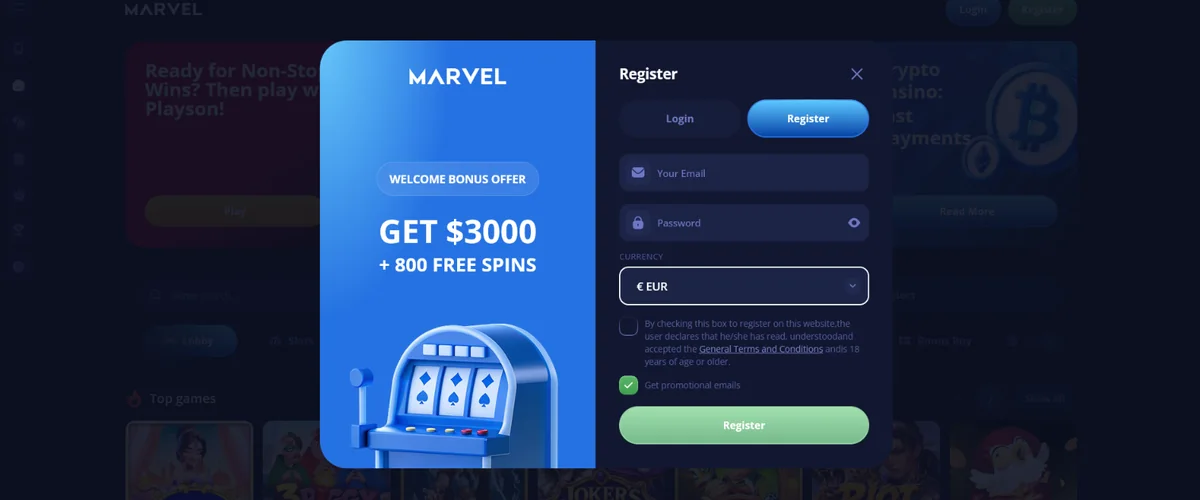
Think about currency before you submit the form. The screenshot shows a currency selector, and the available choices may differ by location or account flow. A selected currency can shape how deposits, balances, limits and promotions are displayed, so choose carefully instead of treating the selector as a cosmetic preference.
Finally, keep the offer details in view. The registration panel advertises 3 000 USD plus 800 free spins, but the homepage and promotions page also display other offers. Read the specific terms and confirm whether the package is automatic or requires a code or opt-in.
Step-by-step Marvel casino registration
Once you have checked the form and promotion, the setup itself is straightforward. Follow the sequence below and pause if a field or condition differs from what you expected.
- Open the registration form using the Register button on the homepage.
- Enter an active email address and create a unique password.
- Choose the account currency shown in the selector.
- Review the welcome offer and enter a promo code only if the promotion instructs you to do so at this stage.
- Open the linked terms, read the account and bonus conditions, then complete the required confirmation.
- Choose whether to receive promotional emails, then submit the form.
- Check your inbox and account page for any confirmation, verification or bonus-activation instructions.
The registration form shown does not display a separate promo-code box in the visible fields. That does not mean every promotion is automatic: some codes may belong on the bonuses page or in the deposit flow. Follow the offer’s own instructions rather than guessing where a code belongs.
After submitting, check that you can sign in and that the selected currency appears correctly. If the welcome offer is not visible, don’t make a deposit just to test it. Check the bonus history or ask support whether the promotion was attached to your account.
Choosing a currency and activating a bonus
Currency choice matters because the same numeric amount represents different real values in different currencies. It can also affect which payment methods, bonus cards and withdrawal limits appear. Compare the cashier and terms in your selected currency before you fund the account.
The 3 000 USD plus 800 free-spin headline is a promotional figure, not a complete description of how the package works. Look for whether the bonus is divided into stages, a minimum deposit, a maximum bonus cap, wagering, eligible games and expiry. If you see a $15 sign-up card as well, check whether it is an alternative promotion or a separate benefit.
If you plan to use a code, note the exact characters and activation point before continuing. The casino displays codes such as FD1, FD2, FD3, SD1 and SD2 on different promotion cards. A code for a deposit offer may not activate a sign-up promotion, and a code may stop working when its campaign changes.
For a closer look at available campaigns and their terms, read the Marvel casino bonus guide. It explains how to compare the welcome package, free spins, deposit matches and promo codes without treating separate banners as one combined offer.
After registration: verify, sign in and get help
Once your account is active, check the profile and inbox for verification instructions. Prepare accurate information and respond promptly if the casino asks for documents. Casino Guru’s review notes a concern about the time allowed to provide information during verification, so don’t leave a request unread until close to its deadline.
If you are returning, use the Login button with the same email and password. When a password does not work, use the reset flow instead of opening another account. A second profile can complicate bonus eligibility and account support.
For a problem with a welcome offer, payment or login, contact support from the account and explain the sequence clearly. Include the promotion name, code if used, currency and approximate time of the action. Keep the answer or chat reference so you can follow up without repeating the whole issue.
Registration is only the first step. Before depositing, confirm the cashier’s methods, withdrawal options and the terms that apply to the offer you selected. Taking a few minutes to check these items gives you a clearer picture of the account you just created.
FAQ
What information do I need for Marvel casino registration?
The visible form asks for an email address, password and currency selection. It also shows an optional promotional-email setting and linked terms.
Can I choose USD or EUR?
The registration form includes a currency selector, but the available choices may depend on the account flow or region. Confirm the options shown to you.
How do I claim the welcome bonus?
Check whether the offer activates automatically or needs a code or opt-in. Confirm it appears in your account before playing or depositing.
Where do I enter a promo code?
Use the location named in that promotion’s terms. It may be during sign-up, on the bonus page or before a deposit.
What if I cannot log in after registering?
Use password recovery with the email on the account. If you still cannot access it, contact support with the email address used to register.