Marvel casino Android: install and open the app
Published:
The Marvel casino Android page shows a short installation flow: tap Install on the app page, confirm the installation in the system dialog and tap Open when it finishes. Follow the prompt displayed by your browser or device. The instructions use an install action and system confirmation rather than a third-party APK download.
| Step | What to do | Result |
|---|---|---|
| 1 | Open the app page and tap Install | Android begins the installation flow |
| 2 | Confirm in the system dialog | The device adds the Marvel app shortcut |
| 3 | Tap Open | The casino launches on your phone |
Prepare your Android phone
Open Marvel casino in a supported mobile browser and wait until the app page finishes loading. Check the address before installing so you know you are using the intended website. If the page is still loading or the connection is unstable, the install button may not appear immediately.
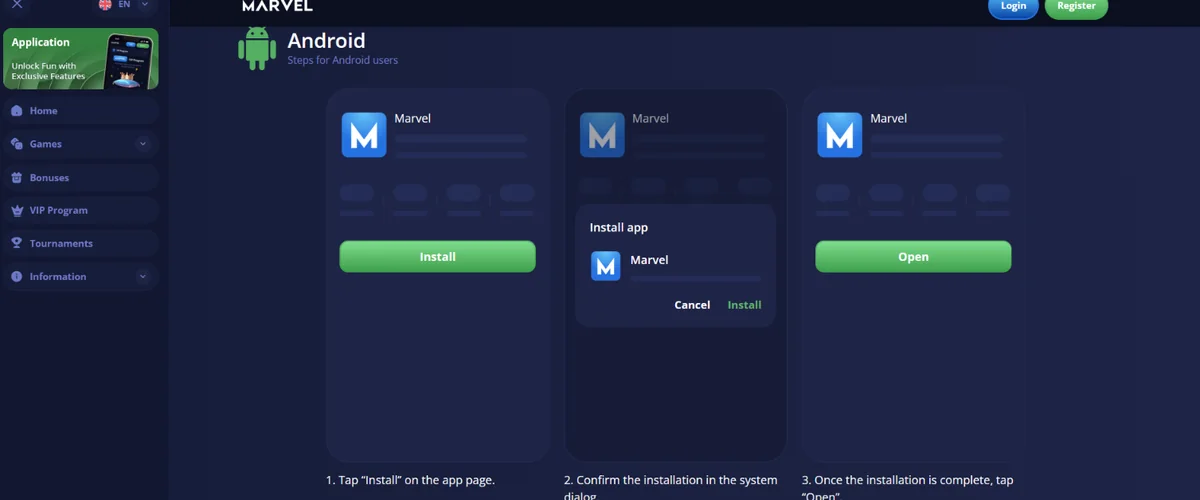
The installation flow shown is initiated from the casino’s app page. Your device may display a browser prompt or a system dialog, and the wording can vary with Android version and browser. Read the prompt before confirming so you know what is being added.
You do not need a new casino profile to install the app. The shortcut leads to the same site account you use in the browser. If you are new, create an account through the official registration form and then sign in from the installed shortcut.
Install the casino in three steps
Use this sequence to complete the setup:
- Tap Install on the casino app page.
- Review and confirm the system dialog.
- Wait for setup to finish, then tap Open.
Depending on the device, the confirmation may appear as a small system panel or a browser prompt. Avoid tapping Cancel if you intend to continue; if you cancel by mistake, reopen the app page and start again.
When the screen shows Open, tap it to launch Marvel. Sign in or browse the lobby. If an icon is added to your home screen or app list, use it for future visits rather than repeating the install steps.
If the prompt does not match the walkthrough, continue with the installation steps and confirm the action shown by Android.
Games, promotions and account access
Once it opens, the mobile lobby gives access to categories such as slots, crash games, live casino, popular titles and new releases. Search can help you find a known title, while categories are better for browsing. Make sure the game loads before you begin so you can see its rules and minimum stake.
The mobile experience also makes it possible to check bonus cards and tournament pages. Read the full terms before activating a promotion, especially if it requires a code or deposit. An install shortcut does not automatically opt you into a bonus.
Use the same email and password associated with your account. If you already have an active session in the browser, the shortcut may still ask you to log in again. That can depend on browser settings or session expiry; it does not necessarily indicate that the installation failed.
Before using the cashier, compare the currency and payment details displayed on the phone with the amount you intend to use. Mobile layout can place details lower on the page, so scroll through the confirmation screen before submitting a transaction.
Fix common Android installation problems
If Install is not available, reload the app page and check the browser menu for an install action. Confirm that you are using a mobile browser that supports site installation. If no prompt appears, you can still access the casino through the browser and bookmark it.
If the system dialog closes or installation stalls, check your connection and available device storage, then reopen the app page. Follow the system’s own message if it explains why the action cannot continue. Do not search for an unofficial app file as a workaround.
If Open launches a blank or old page, close the shortcut, visit the casino directly in the browser and reload. You can then retry the shortcut. For more mobile setup help, see the Marvel casino app guide. For login or bonus issues, contact support and state your device model, Android version, browser and the step where the problem occurred.
FAQ
How do I install Marvel casino on Android?
Open the casino’s app page, tap Install, confirm in the system dialog and tap Open when installation finishes.
Do I need to download an APK?
The shown instructions start from the app page and use the device’s installation prompt. They do not direct you to a third-party APK.
Why is the Install button missing?
Try a supported mobile browser, reload the page and check its menu for an install option.
Will installation create a new account?
No. Use the same account credentials you use on the casino website, or register through the official form first.
What should I do if Open does not work?
Open the site directly in your browser, reload it and retry the shortcut. Contact support if the issue continues.