Marvel casino deposit and withdrawals: payment guide
Published:
The Marvel casino cashier lists several ways to fund an account, including cryptocurrency, Apple Pay, Revolut, e-wallet and bank-transfer options. The displayed deposit table marks the shown methods as free and instant, but a withdrawal follows a separate process: the casino sends an approved request to the payment provider, and the final credit time depends on that provider. Use this guide to compare the displayed limits and understand what to check before paying.
| Payment detail | What the cashier or site states |
|---|---|
| Deposit processing | Shown as instant for the displayed methods |
| Deposit commission | Shown as free for the displayed methods |
| Cryptocurrency fee | Network fee may apply; it depends on the blockchain |
| Withdrawal processing | Casino processes the request, then the payment system completes the transfer |
| Withdrawal limits | Casino Guru lists currency-specific daily, weekly and monthly limits |
Deposit methods and displayed limits
The cashier’s visible rows include Binance, Apple Pay, USDC networks, Revolut, Tether TRC20, bank transfer, Ethereum, Toncoin, Neosurf, EPS and Mach. For a broader look at the site before choosing a payment option, visit Marvel casino. Availability can vary with your location and selected currency, so use the limits shown in your own cashier as the final reference.
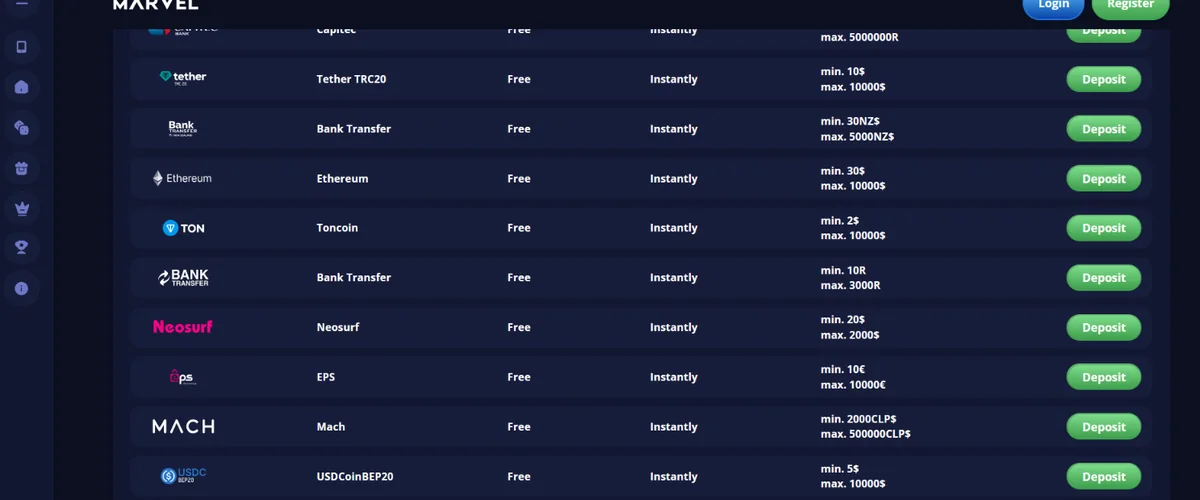
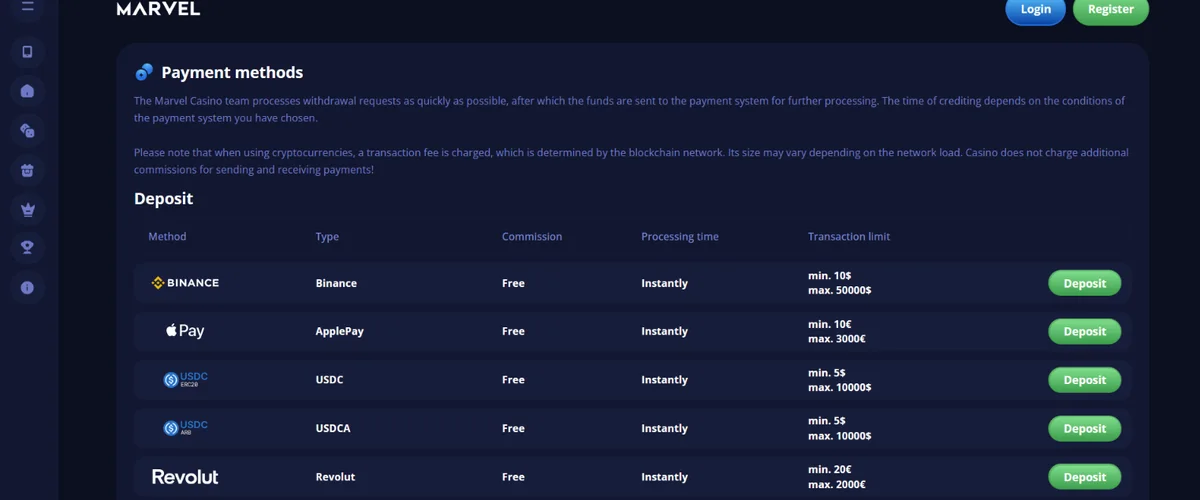
The visible deposit rows mark the methods shown as “Free” and “Instantly.” That describes the casino’s displayed deposit processing, not necessarily the time a bank or wallet takes to update its own records. The cashier also shows method-specific minimums and maximums, which can differ substantially by currency and payment rail.
| Method displayed | Deposit fee / time | Visible transaction range |
|---|---|---|
| Binance | Free / instantly | $10–$50,000 |
| Apple Pay | Free / instantly | €10–€3,000 |
| USDC ERC20 | Free / instantly | $5–$10,000 |
| USDC Arbitrum | Free / instantly | $5–$10,000 |
| Revolut | Free / instantly | €20–€2,000 |
| Tether TRC20 | Free / instantly | $10–$10,000 |
| Ethereum | Free / instantly | $30–$10,000 |
| Toncoin | Free / instantly | $2–$10,000 |
| Neosurf | Free / instantly | $20–$2,000 |
| EPS | Free / instantly | €10–€10,000 |
| Mach | Free / instantly | CLP$2,000–CLP$500,000 |
These are examples visible in the cashier, not a guarantee that every option will appear for every account. Other rows show bank-transfer ranges in New Zealand dollars and in a currency marked “R.” Check the exact currency label, minimum and maximum on your own deposit screen before continuing.
How to make a deposit
Once you have chosen a method, compare the amount and currency on the cashier with the payment app or wallet you are about to use. The steps below keep those details aligned:
- Sign in to your account and open the Deposit or Cashier section.
- Select a payment method that is available to your account.
- Review the displayed currency, minimum and maximum, fee and processing time.
- Enter an amount within the shown range and confirm the payment details.
- Complete the transaction with the payment provider, then check your casino balance and transaction history.
If a welcome promotion requires a deposit code, follow its instructions before confirming the payment. The Marvel casino registration guide explains where account currency and bonus activation fit into initial setup; the separate offer rules determine whether a deposit qualifies.
If the cashier shows a free deposit, still check whether your bank, wallet or blockchain applies its own charge. Cryptocurrency network fees are determined by the relevant chain and can vary with network load; the casino states that it does not add its own sending or receiving commission.
Requesting a withdrawal
To withdraw, open the cashier after signing in and choose an available withdrawal method. The site says its team processes requests as quickly as possible, then forwards the funds to the selected payment system. The time needed for the money to reach you depends on that system and its own processing conditions.
Before submitting, check that your account details match the payment account and that any requested verification is complete. If the casino asks for supporting information, respond promptly and keep the request details. A mismatch in name, currency or payment destination can delay a transfer while the provider or casino checks it.
Casino Guru’s review lists withdrawal limits of €1,000 per day, €2,500 per week and €10,000 per month, with different limits for USD and PLN accounts. These review-database figures may not match every payment method or current account. Confirm your live cashier and applicable terms before planning a larger withdrawal.
Keep a record of the requested amount, method, date and transaction reference. If a request remains pending, contact support with those details and ask whether the casino is still processing it or whether the payment provider has received it. This helps distinguish casino review time from external transfer time.
Fees, timing and common payment issues
There are two separate timing stages in a withdrawal: the casino’s review and the payment system’s delivery. A status such as “processed” may mean the casino has sent the funds onward, not that they have already appeared in a bank or wallet. Check the method’s stated processing guidance and your provider’s transaction history.
The payment-method carousel in the site footer displays badges for options including Tether, Bitcoin Cash, Bybit Pay, Visa, Litecoin, Cardano and Rapid. A footer badge is a useful overview, but the cashier is the place to confirm which options support deposits or withdrawals on your account.
For crypto, select the same network shown by the casino in your wallet. A mismatch between networks or addresses can cause a transfer problem that cannot be fixed by waiting. Copy the address carefully, verify the network and amount, and consider the displayed network fee before confirming.
If a deposit does not appear, first check whether the payment provider marked it successful and whether the amount met the cashier’s minimum. Save a receipt or transaction hash for crypto payments. If the provider confirms completion but the casino balance has not updated, send support the time, amount, method and reference.
For a withdrawal delay, check account messages, verification status, active bonus conditions and the payment method’s own status. Contact support with a concise timeline instead of creating a second withdrawal request for the same funds. That makes it easier to trace the original transaction.
FAQ
Which deposit methods does Marvel casino show?
The cashier displays options including Binance, Apple Pay, Revolut, crypto networks, bank transfers, Neosurf, EPS and Mach. Availability depends on the account.
Are deposits instant and free?
The visible cashier rows are marked free and instant. A bank, wallet or blockchain may still apply its own fee or processing time.
How long do Marvel casino withdrawals take?
The casino processes the request first; final credit time depends on the chosen payment system and its conditions.
Does Marvel casino charge crypto fees?
The site says it adds no sending or receiving commission, but blockchain network fees may apply and can vary.
What should I do if a payment is delayed?
Check your account messages and provider status, then contact support with the amount, method, date and transaction reference.